%PDF-
%PDF-
Mini Shell
 Mini Shell
/**
 * Handle the site icon setting in options-general.php.
 *
 * @since 6.5.0
 * @output wp-admin/js/site-icon.js
 */

/* global jQuery, wp */

( function ( $ ) {
	var $chooseButton = $( '#choose-from-library-button' ),
		$iconPreview = $( '#site-icon-preview' ),
		$browserIconPreview = $( '#browser-icon-preview' ),
		$appIconPreview = $( '#app-icon-preview' ),
		$hiddenDataField = $( '#site_icon_hidden_field' ),
		$removeButton = $( '#js-remove-site-icon' ),
		frame;

	/**
	 * Calculate image selection options based on the attachment dimensions.
	 *
	 * @since 6.5.0
	 *
	 * @param {Object} attachment The attachment object representing the image.
	 * @return {Object} The image selection options.
	 */
	function calculateImageSelectOptions( attachment ) {
		var realWidth = attachment.get( 'width' ),
			realHeight = attachment.get( 'height' ),
			xInit = 512,
			yInit = 512,
			ratio = xInit / yInit,
			xImg = xInit,
			yImg = yInit,
			x1,
			y1,
			imgSelectOptions;

		if ( realWidth / realHeight > ratio ) {
			yInit = realHeight;
			xInit = yInit * ratio;
		} else {
			xInit = realWidth;
			yInit = xInit / ratio;
		}

		x1 = ( realWidth - xInit ) / 2;
		y1 = ( realHeight - yInit ) / 2;

		imgSelectOptions = {
			aspectRatio: xInit + ':' + yInit,
			handles: true,
			keys: true,
			instance: true,
			persistent: true,
			imageWidth: realWidth,
			imageHeight: realHeight,
			minWidth: xImg > xInit ? xInit : xImg,
			minHeight: yImg > yInit ? yInit : yImg,
			x1: x1,
			y1: y1,
			x2: xInit + x1,
			y2: yInit + y1,
		};

		return imgSelectOptions;
	}

	/**
	 * Initializes the media frame for selecting or cropping an image.
	 *
	 * @since 6.5.0
	 */
	$chooseButton.on( 'click', function () {
		var $el = $( this );

		// Create the media frame.
		frame = wp.media( {
			button: {
				// Set the text of the button.
				text: $el.data( 'update' ),

				// Don't close, we might need to crop.
				close: false,
			},
			states: [
				new wp.media.controller.Library( {
					title: $el.data( 'choose-text' ),
					library: wp.media.query( { type: 'image' } ),
					date: false,
					suggestedWidth: $el.data( 'size' ),
					suggestedHeight: $el.data( 'size' ),
				} ),
				new wp.media.controller.SiteIconCropper( {
					control: {
						params: {
							width: $el.data( 'size' ),
							height: $el.data( 'size' ),
						},
					},
					imgSelectOptions: calculateImageSelectOptions,
				} ),
			],
		} );

		frame.on( 'cropped', function ( attachment ) {
			$hiddenDataField.val( attachment.id );
			switchToUpdate( attachment );
			frame.close();

			// Start over with a frame that is so fresh and so clean clean.
			frame = null;
		} );

		// When an image is selected, run a callback.
		frame.on( 'select', function () {
			// Grab the selected attachment.
			var attachment = frame.state().get( 'selection' ).first();

			if (
				attachment.attributes.height === $el.data( 'size' ) &&
				$el.data( 'size' ) === attachment.attributes.width
			) {
				switchToUpdate( attachment.attributes );
				frame.close();

				// Set the value of the hidden input to the attachment id.
				$hiddenDataField.val( attachment.id );
			} else {
				frame.setState( 'cropper' );
			}
		} );

		frame.open();
	} );

	/**
	 * Update the UI when a site icon is selected.
	 *
	 * @since 6.5.0
	 *
	 * @param {array} attributes The attributes for the attachment.
	 */
	function switchToUpdate( attributes ) {
		var i18nAppAlternativeString, i18nBrowserAlternativeString;

		if ( attributes.alt ) {
			i18nAppAlternativeString = wp.i18n.sprintf(
				/* translators: %s: The selected image alt text. */
				wp.i18n.__( 'App icon preview: Current image: %s' ),
				attributes.alt
			);
			i18nBrowserAlternativeString = wp.i18n.sprintf(
				/* translators: %s: The selected image alt text. */
				wp.i18n.__( 'Browser icon preview: Current image: %s' ),
				attributes.alt
			);
		} else {
			i18nAppAlternativeString = wp.i18n.sprintf(
				/* translators: %s: The selected image filename. */
				wp.i18n.__(
					'App icon preview: The current image has no alternative text. The file name is: %s'
				),
				attributes.filename
			);
			i18nBrowserAlternativeString = wp.i18n.sprintf(
				/* translators: %s: The selected image filename. */
				wp.i18n.__(
					'Browser icon preview: The current image has no alternative text. The file name is: %s'
				),
				attributes.filename
			);
		}

		// Set site-icon-img src and alternative text to app icon preview.
		$appIconPreview.attr( {
			src: attributes.url,
			alt: i18nAppAlternativeString,
		} );

		// Set site-icon-img src and alternative text to browser preview.
		$browserIconPreview.attr( {
			src: attributes.url,
			alt: i18nBrowserAlternativeString,
		} );

		// Remove hidden class from icon preview div and remove button.
		$iconPreview.removeClass( 'hidden' );
		$removeButton.removeClass( 'hidden' );

		// Set the global CSS variable for --site-icon-url to the selected image URL.
		document.documentElement.style.setProperty(
			'--site-icon-url',
			'url(' + attributes.url + ')'
		);

		// If the choose button is not in the update state, swap the classes.
		if ( $chooseButton.attr( 'data-state' ) !== '1' ) {
			$chooseButton.attr( {
				class: $chooseButton.attr( 'data-alt-classes' ),
				'data-alt-classes': $chooseButton.attr( 'class' ),
				'data-state': '1',
			} );
		}

		// Swap the text of the choose button.
		$chooseButton.text( $chooseButton.attr( 'data-update-text' ) );
	}

	/**
	 * Handles the click event of the remove button.
	 *
	 * @since 6.5.0
	 */
	$removeButton.on( 'click', function () {
		$hiddenDataField.val( 'false' );
		$( this ).toggleClass( 'hidden' );
		$iconPreview.toggleClass( 'hidden' );
		$browserIconPreview.attr( {
			src: '',
			alt: '',
		} );
		$appIconPreview.attr( {
			src: '',
			alt: '',
		} );

		/**
		 * Resets state to the button, for correct visual style and state.
		 * Updates the text of the button.
		 * Sets focus state to the button.
		 */
		$chooseButton
			.attr( {
				class: $chooseButton.attr( 'data-alt-classes' ),
				'data-alt-classes': $chooseButton.attr( 'class' ),
				'data-state': '',
			} )
			.text( $chooseButton.attr( 'data-choose-text' ) )
			.trigger( 'focus' );
	} );
} )( jQuery );
Zerion Mini Shell 1.0
在线中文学校 7/24,专为华裔青少儿设计,教学经验丰富|灵犀中文
跳至内容
班主任全程跟踪,及时给家长反馈孩子学习情况,全方位保障孩子学有所成。
灵活的上课时间 ( 7*24 ),随时随地在线学中文。
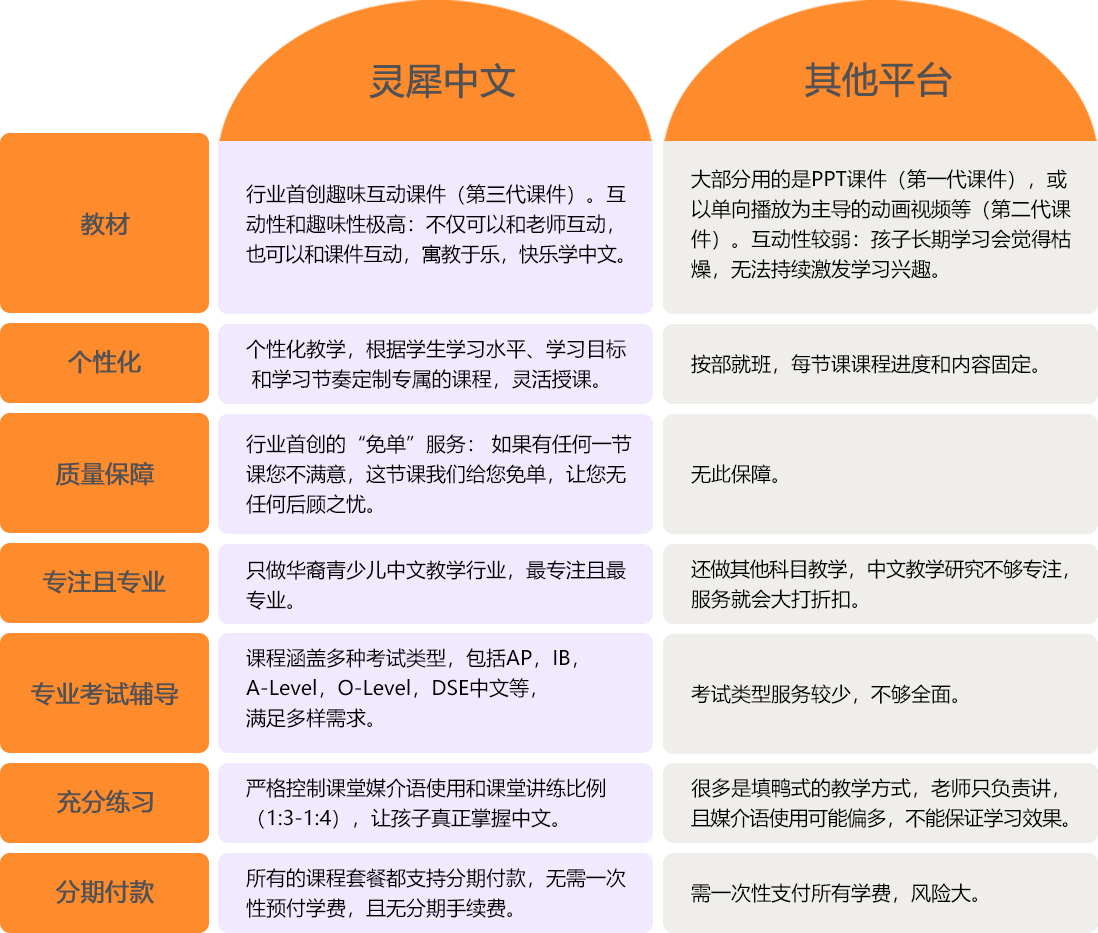
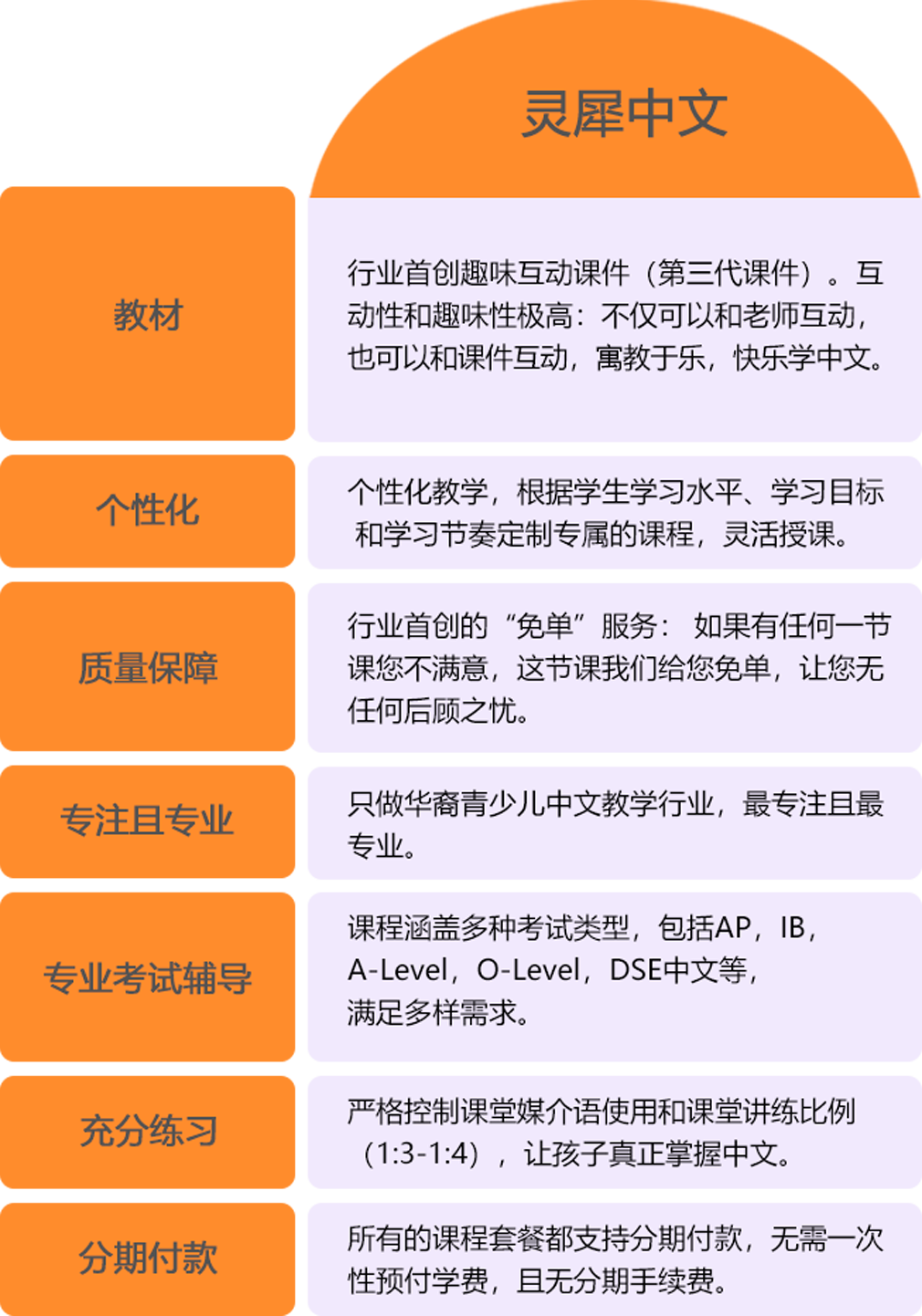
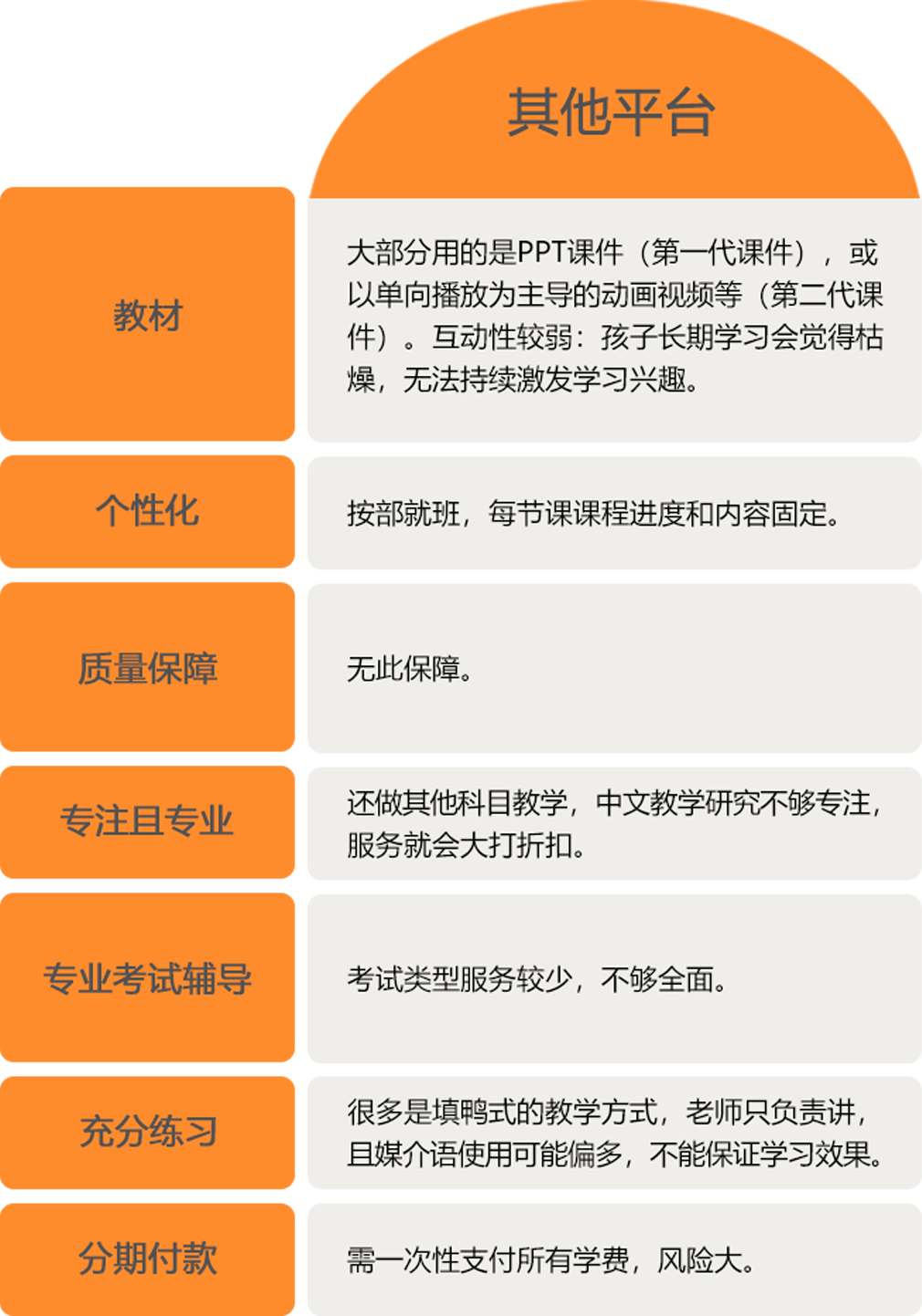
学生不仅可以和课件互动,还能加强和老师的互动。学生、教师和课件三位一体,互动性空前提升,让老师对学生的学习效果把控地更加准确,教学更有效。
通过非常丰富的互动体验和精美的趣味元素设计,让孩子更能记住所学的内容,真正做到寓教于乐,让学生能够快乐地学好中文。
灵犀中文的教研团队深耕行业多年,深谙华裔孩子中文学习的特点。课件专业针对华裔青少儿中文学习的特点制作,让孩子的学习更加科学。
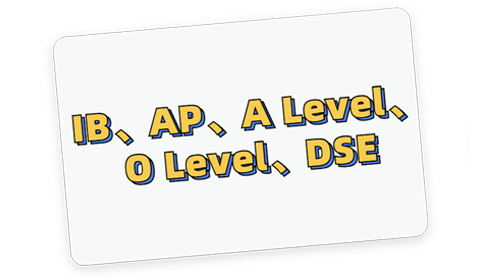
覆盖多种中文考试课程,包括IB中文、AP中文、A-Level中文、O-Level中文和DSE中文,满足不同中文考试辅导的需求。
所有考试辅导皆为1对1名师教学,根据考生的水平制定个性化备考课程计划,针对弱项快速补强。
灵犀的老师有着丰富的考试辅导经验,深谙各中文考试的大纲和重点,帮助学生超越自我,考取高分。
灵犀中文掌握华裔青少儿中文教学的精髓,让您的孩子快乐高效地学好中文!
练习充分,讲练比例1:4,全面提升听说读写,让孩子真正学会中文
趣味课堂互动,锻炼孩子语言交际能力,激发孩子中文学习兴趣